
Here's how to receive an NFT.
Receive it with a single click!
While logged in to HEXA, you can receive it with a single click. Just click the gift link or scan the QR code, and a receiving screen like the one below will appear. Choose the nickname to receive it under and press the Receive button. That's it.
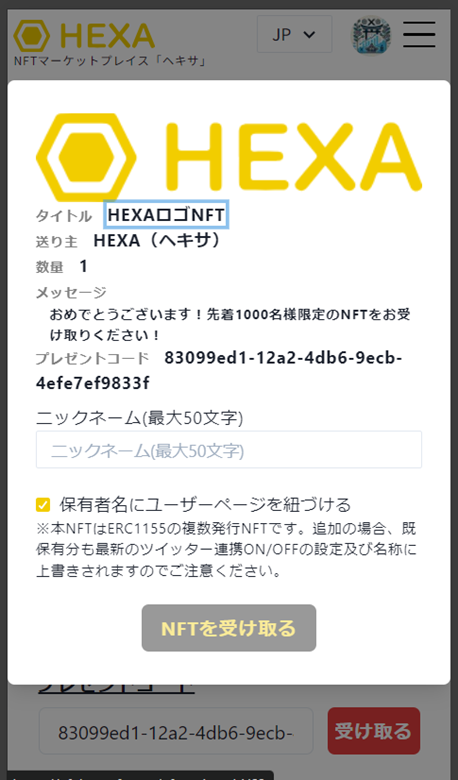
If you received a gift code, log in to HEXA, go to My Page → Gift, and simply enter the gift code to receive it.

If you don't have a HEXA account
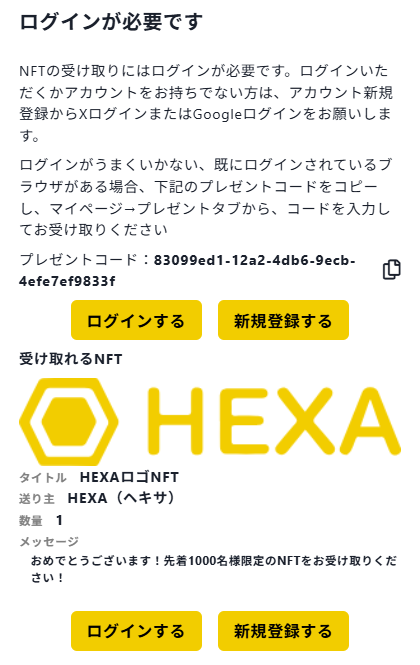
If you don't have a HEXA account, the login screen below will appear. Click "Sign up."
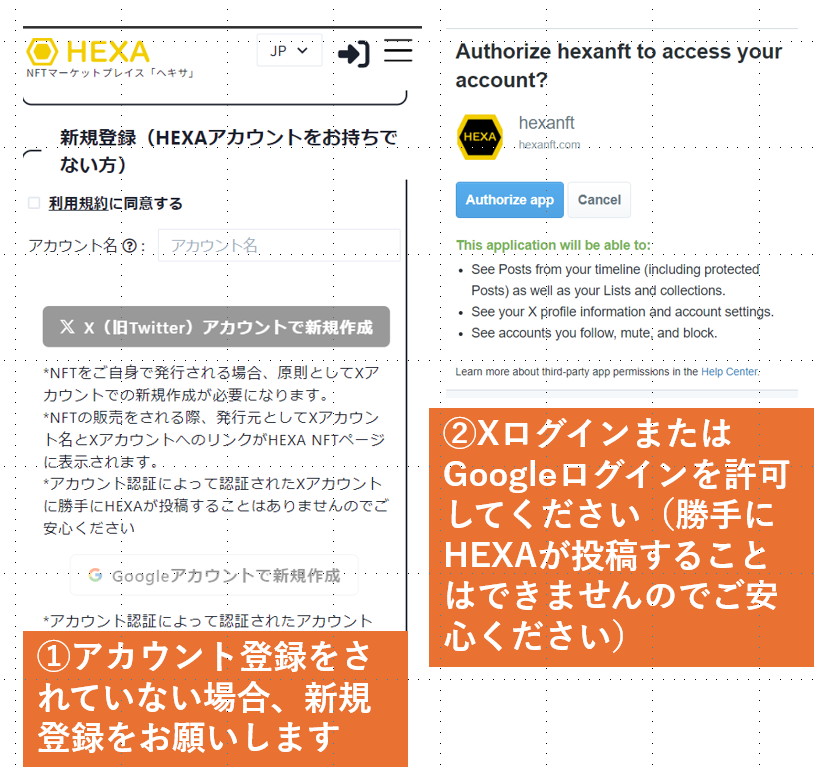
If you choose to sign up with an X account or Google login, a screen like ② will appear. Please grant permission.
*HEXA only refers to your X or Google account information to log you in to HEXA. Rest assured that your password is never shared with HEXA, and HEXA cannot post on your behalf without your permission.
Detailed guide for first-time users
If you need more detailed step-by-step instructions, see below for explanations of each case: gift link, gift code and QR code.
Gift link
1) Click the NFT gift link, which looks like the one below
https://nft.hexanft.com/mypage?tab=present&code=83099ed1-12a2-4db6-9ecb-4efe7ef9833f
*The above is a sample link. Please click the link from the person who sent you the gift.
2) If you are already logged in to HEXA, screen ④ will appear and you can receive the NFT right away.
(If you don't have a HEXA account)
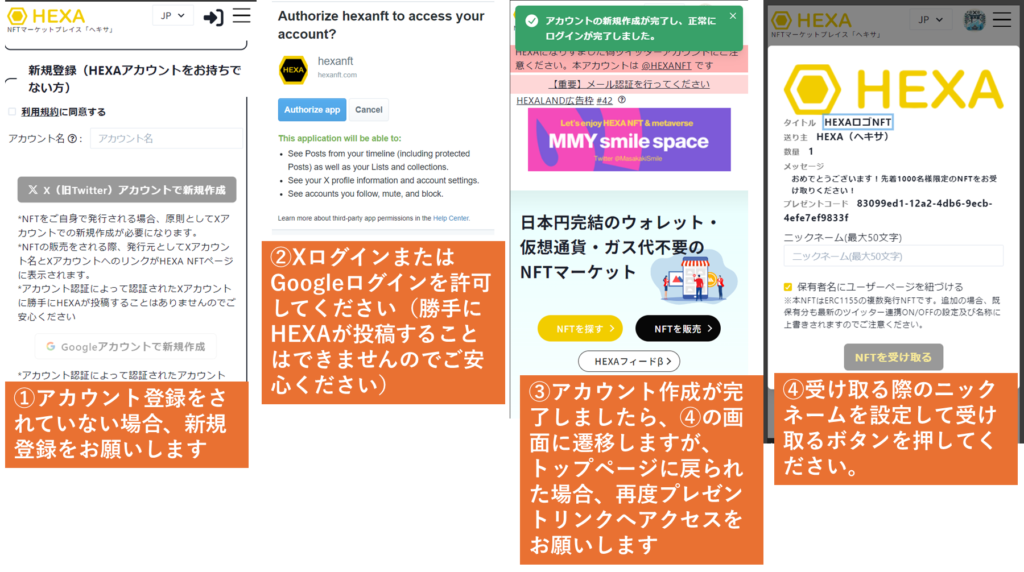
3) If you don't have a HEXA account, screen ① will appear. Please create a HEXA account via Sign up. You can log in with an X account or a Google account.
4) If you choose to sign up with an X account or Google login, a screen like ② will appear. Please grant permission.
*HEXA only refers to your X or Google account information to log you in to HEXA. Rest assured that your password is never shared with HEXA, and HEXA cannot post on your behalf without your permission.
5) Once you have logged in, the receiving screen ④ will appear. Set a nickname and press the Receive button to finish. If you end up back on the HEXA top screen ③, click the gift link again and screen ④ will appear.
QR code
1) Scan the QR code, which looks like the one below
*The above is a sample QR code. Please scan the QR code from the person who sent you the gift.
2) If you are already logged in to HEXA, screen ④ will appear and you can receive the NFT right away.
(If you don't have a HEXA account)
3) If you don't have a HEXA account, screen ① will appear. Please create a HEXA account via Sign up. You can log in with an X account or a Google account.
4) If you choose to sign up with an X account or Google login, a screen like ② will appear. Please grant permission.
*HEXA only refers to your X or Google account information to log you in to HEXA. Rest assured that your password is never shared with HEXA, and HEXA cannot post on your behalf without your permission.
5) Once you have logged in, the receiving screen ④ will appear. Set a nickname and press the Receive button to finish. If you end up back on the HEXA top screen ③, scan the QR code again and screen ④ will appear.
Gift code
1) Log in to HEXA and enter the gift code in the Gift tab on My Page to receive the NFT.
Example gift code: 83099ed1-12a2-4db6-9ecb-4efe7ef9833f
2) If you are already logged in to HEXA, screen ④ will appear and you can receive the NFT right away.
(If you don't have a HEXA account)
3) If you don't have a HEXA account, please create one via Sign up at this link. You can log in with an X account or a Google account.
4) If you choose to sign up with an X account or Google login, a screen like ② will appear. Please grant permission. Then follow steps 1) and 2) to receive the NFT.
*HEXA only refers to your X or Google account information to log you in to HEXA. Rest assured that your password is never shared with HEXA, and HEXA cannot post on your behalf without your permission.