
The NFT marketplace HEXA has released an alpha version of "Scale-free," an NFT holder-only community feature that lets NFT issuers make announcements exclusively to holders of the NFTs they issue and communicate with those holders. You can create and run a community (DAO) limited to NFT holders.

Contents
- Benefits of the holder-only community feature (DAO)
- How to create a holder-only community (DAO)
- Linking multiple specific collections to one community
- DAO voting feature
- Running surveys and other form submissions
- Appointing community admins
- When you are no longer an NFT holder
- Notifications for posts in holder-only communities
- Changing your poster name in a community
- Replying to comments in a topic
- Issuers and admins can delete and edit topics
- Comments can be deleted
- Issuers can change collection settings and delete communities
- Terms for the community service
Benefits of the holder-only community feature (DAO)
With "Scale-free," the NFT holder-only community feature, you can build a DAO. For example, you can run Web3-style online salons or fan clubs, and carry out a wide range of other initiatives. Participants hold ownership of data in the form of NFTs, making it easy to build relationships in which everyone works together to energize the community. No crypto or wallet is required, so users don't need to buy crypto or set up a wallet to join a community or buy NFTs. This makes it possible to run a Web3-style community that many users can easily join.
Users can join a community by buying the relevant NFT. Once they have helped energize the community and the NFT's value has risen, they can also resell it. When users let go of their NFT, they automatically leave the community. This means issuers no longer need to manage adding or removing community members, and no longer bear the burden of identifying holders and inviting them to the community. Issuers can also reliably deliver information to users who hold their NFTs, building ongoing relationships through NFTs. In the future, we are also considering support for NFTs other than HEXA NFTs.
How to create a holder-only community (DAO)
1. Apply to issue an NFT and issue it (skip this step if you have already issued one)
Apply to issue an NFT here. With X (formerly Twitter) login, you can complete an NFT issuance application in as little as 30 seconds.
2. If you want to create multiple communities, set up collections (optional)
Go to My Page → Issued NFTs and set up collections for the NFTs you have issued. If your community is for holders of all the NFTs you issue, this step is not needed.
3. Create a community
From the Community tab in My Page, you can create a community for each collection (or for all your NFTs).

Press the create button to set the title, description and banner image as shown below. This information is public to everyone, including people who do not hold the NFT, so we recommend describing the community in a way that is easy for outsiders to understand.

After creating a community, you can use the create topic button to create topics with content you want to share only with NFT holders.

When creating a topic, you can use a checkbox to choose whether to accept comments from NFT holders. If you only want to share information without accepting comments, uncheck “Allow comments” (only the issuer can then comment). You can also upload images.

Once you post a topic, NFT holders can view it as shown below. Topics and comments can also be given a heart with the “♡” button to let the issuer or commenter know you have read them.

Linking multiple specific collections to one community
You can link multiple specific collections to a single community. To do so, select “Add this collection to an existing community” from the create community button.

DAO voting feature
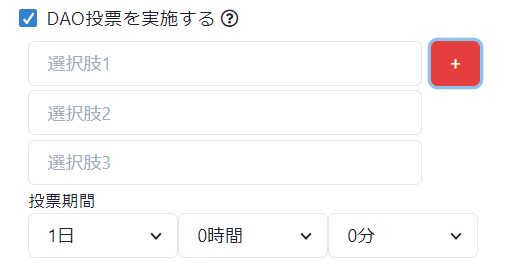
You can hold votes within a community. The issuer presents the options, and holders can vote according to the number of NFTs they hold. Voting lets you gauge the views of NFT holders weighted by how many NFTs they hold, which you can use as input for decisions about running the community.
Note that votes cannot be changed afterward. If you transfer or sell your NFT before the voting period ends, your vote becomes invalid. For non-fixed collections, if the issuer adds NFTs to the collection, the pool of eligible voters grows, and if NFTs are removed, the votes for them become invalid. Also, if you buy additional eligible NFTs during the voting period after you have voted, your vote count increases accordingly.
Running surveys and other form submissions
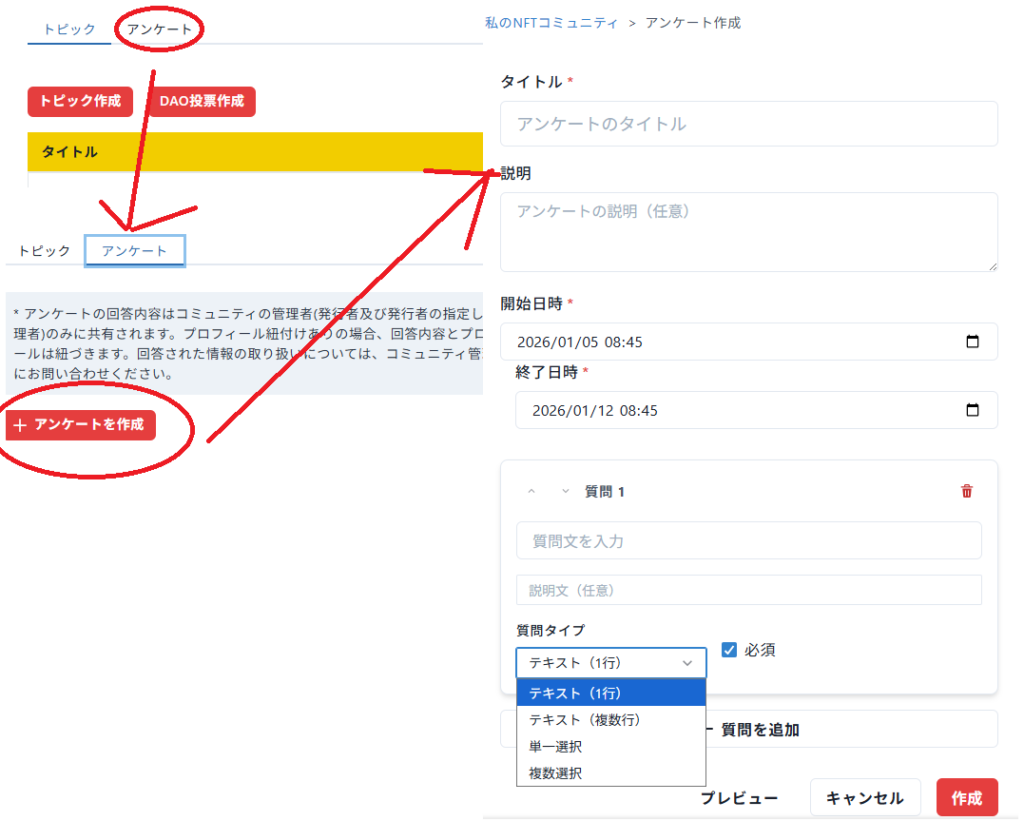
You can create forms to collect survey responses or applications from users in your community. This also lets you run campaigns for community users, such as gifts sent by mail.
Appointing community admins
You can also grant admin permissions to community members other than the issuer. Users appointed as admins can do the following:
1) Create, edit and delete topics
2) Delete comments posted by others
Note that only NFT holders who have made their X link public can be appointed as admins. Also, please be aware that if they no longer hold the NFT, they will lose access to the community even if they are an admin.

When you are no longer an NFT holder
If you are no longer an NFT holder because you sold or transferred your NFT, you will no longer be able to view the community's content. (Lending an NFT through the metaverse lending feature does not transfer ownership, which stays with the lender, so community access cannot be lent.) Comments you posted in the community remain even after you are no longer an NFT holder.
Notifications for posts in holder-only communities
When the issuer (NFT issuer) creates a new topic, NFT holders receive an email notification. In addition, messages from the issuer (NFT issuer) and, for the issuer, comments from participants are shown as alerts at the top of the screen on the HEXA site. You can turn these off from My Page → Community.

Changing your poster name in a community
Both community operators and posters can change their name from My Page → Community → Name in community. Once you set a name, it is applied to all your past posts and comments as well as future posts.

Replying to comments in a topic
When replying to a comment in a topic, you can now click "Reply" so that your reply includes an in-page link showing which comment you are replying to.

Issuers and admins can delete and edit topics
Issuers and admins can delete or edit topics at any time (including adding and removing images). When a topic is edited, the date and time of the edit is displayed.
Comments can be deleted
Issuers and admins can delete comments (including those of other participants). Participants can also delete their own comments.
Issuers can change collection settings and delete communities
Issuers can remove specific NFTs from a collection's settings or delete the community itself at any time. Even if you joined a community by buying an eligible NFT, you will lose access to the community if the issuer, at their discretion, removes that NFT from the collection settings. Please also note that the issuer can delete a community at any time.
You can delete a community from My Page → Community → Edit → Delete this community.

Terms for the community service
Please see the terms for the community service here (Japanese).