
You can also gift NFTs you hold to other people. NFT gifts are used for many purposes: to build excitement for an NFT project by introducing it to more people, as a present to express everyday gratitude, or as prizes in treasure hunts and stamp rallies in the real world or in the metaverse.
Choose the NFT to gift
To send a gift, open the "Owned NFTs" tab on My Page. NFTs that have already been issued (for an NFT you have just bought, you need to wait a little until it is issued on the blockchain) show a red button with a gift icon. Click that red button to open the gift menu.

Ways to gift
The gift menu offers four main ways to gift (across three tabs).
Gift by specifying an X (formerly Twitter) account name
You can gift to someone by specifying their X account ID. You can also include a message to the recipient. The recipient will receive a gift notification, along with your message, in their HEXA notifications and at their HEXA-registered email address. Please note that the ID will not be recognized correctly if it contains unnecessary spaces or similar characters. For ERC1155-type NFTs, you can send multiple NFTs to multiple people at once.

Gift by specifying an email address
If you know someone's email address, you can gift to them by specifying it. The recipient will receive an email from HEXA notifying them that an NFT has been gifted to them. People without a HEXA account will need to create one to receive it. For ERC1155-type NFTs, you can send multiple NFTs to multiple people at once.

Gift with a gift code
If you know neither the recipient's X account ID nor their email address, you can issue a gift code (similar to an Amazon gift code) and gift with it. For ERC1155-type NFTs, the code can cover multiple NFTs, with one NFT per account. It remains valid until all the NFTs allocated for first-come, first-served distribution have been given out.

Recipients can receive the NFT by entering the gift code in the "Gift" tab on My Page.

Gift with a QR code or receiving link
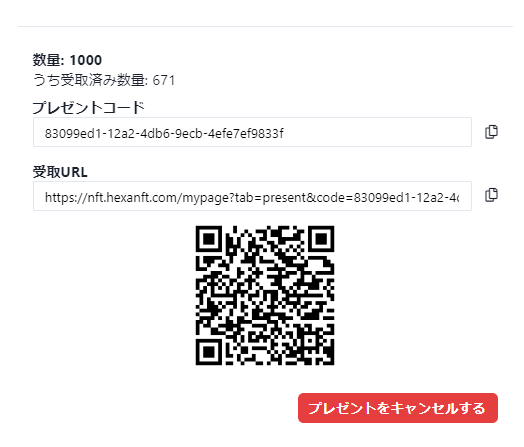
For recipients who will receive via QR code, select "Create gift code" and generate a code as well; this generates a QR code and a receiving link, which you can use to gift the NFT. For ERC1155-type NFTs, they can cover multiple NFTs, with one NFT per account. They remain valid until all the NFTs allocated for first-come, first-served distribution have been given out.
By printing and posting the displayed QR code, or displaying it in the metaverse, you can gift the NFT to anyone who scans it. You can also gift it by sending the receiving link via social media or email.
Offering on the NFT page
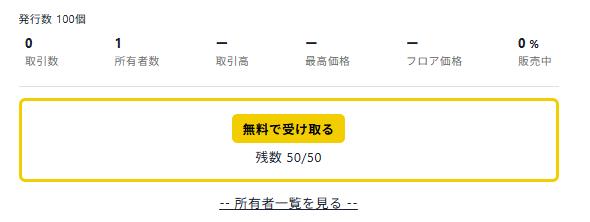
To make a free NFT distribution public so that many people can receive it, check "Also offer on the NFT page" in the "Create gift code" tab. A "Receive for free" button will then appear on the NFT page so people can receive it.
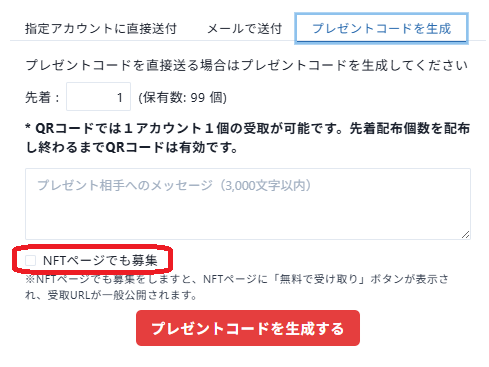
When you check "Also offer on the NFT page," a button appears on the NFT page as shown below.
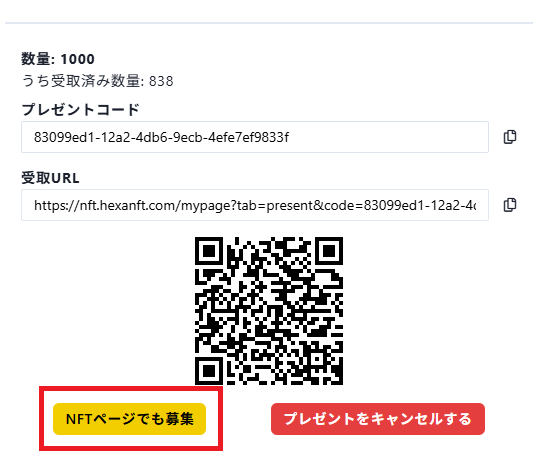
Even if you have already issued a gift code in the past, you can make the button appear by pressing the "Also offer on the NFT page" button on the screen for checking the gift code from Owned NFTs.
About the NFTs you can gift
Only issued NFTs that you hold can be gifted. There are two ways to gift NFTs you have issued yourself.
Issue ERC1155 NFTs with the airdrop feature
You can issue multiple NFTs based on the same data. For how to issue and airdrop ERC1155 NFTs, see here.
Issue ERC721 NFTs by buying them yourself
You can list the NFT in a private sale and buy it yourself so that it becomes one of your Owned NFTs.