

This page explains how to buy NFTs sold in INO format. If you are considering selling NFTs in INO format, please see here.
Contents
- What is an INO?
- ① Log in to HEXA
- ② Make a purchase reservation for NFTs sold in INO format
- ③ Lottery results and purchasing if you win
- ④ Proof of holding and the holding check feature
What is an INO?
INO stands for Initial NFT Offering, a sales method used when an NFT project holds the first primary sale of its NFTs (Non-Fungible Tokens). It works much like an initial public offering (IPO) of shares: the NFT project's overview, roadmap and other details are published, and a set purchase reservation period is held. Among those who apply to buy during the sales period, the winners of a lottery can actually make the purchase.
By concentrating awareness of the project among many people within a set period, the project's appeal can be communicated widely and intensively in a short time. Buyers who take part in an INO also get the opportunity to buy a certain quantity in the very first primary sale.
Also, unlike ERC721, a single NFT can have multiple owners. This makes it possible to use NFTs not only for art projects but for all kinds of projects.
① Log in to HEXA
From the HEXA top page, sign up for HEXA or log in (if you already have an account).
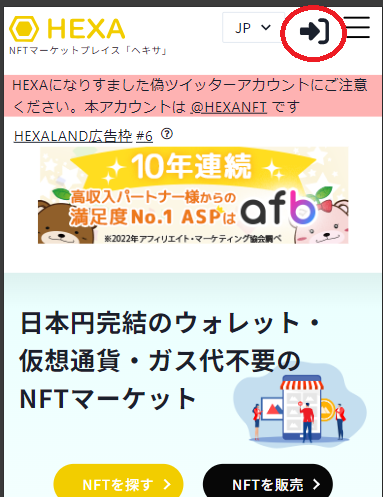
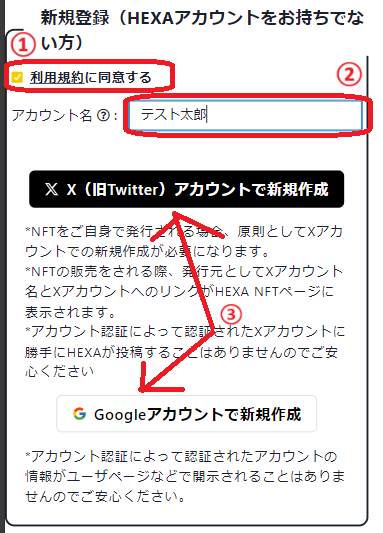
You log in to HEXA with an X (formerly Twitter) account or a Google account. If you don't have a HEXA account, you need to sign up. To sign up, review and agree to the Terms of Use, choose an account name, and then create your account with X login or Google login. With X login, you need to authorize the connected app. If you don't have an X account, please register on the official X website.
② Make a purchase reservation for NFTs sold in INO format
NFTs sold in INO format are sold in limited quantities by lottery sale. You make a purchase reservation, and if you win the lottery held later, you can make the purchase.
During the application period, click the "Apply to purchase" button on the purchase reservation page.

Set a nickname (shown publicly as the NFT holder) and enter an email address for HEXA to contact you (not shown publicly).
If you check the option to add a user page link to the reservation name, a link to your user page can be added to your holder name (optional).
You can reserve one or more NFTs, but because the number for sale is limited, please understand that if there are many applicants, you may not be able to buy as many as you want, or may not be able to buy any at all. (For example, if you apply for 10, you might win all 10, or 7, or 3, or none at all (0).)

Please note
You cannot cancel or reduce the number of NFTs afterwards. After applying for 10, you cannot reduce it by 3 to 7. You can, however, make an additional application (applying for 3 more after applying for 10, for a total of 13).

When you click the "Apply to purchase" button, an email asking you to give final confirmation of your purchase application will be sent to the email address you entered. If everything is correct, click the link in the email.

SMS verification by phone number is required the first time only. Once you confirm your purchase reservation, it cannot be canceled if you win.

Clicking the link completes your purchase application, and the page below is displayed.

③ Lottery results and purchasing if you win
The lottery results will be emailed to you on the announcement date. If you win, go to the payment page from the payment link in the email and complete your payment.
To pay by credit card, click "Pay by credit card." You will then be taken to the credit card company's payment screen. After that, a 3D Secure authentication screen may appear if required (the screen differs by card company). If it appears, enter your 3D Secure password and submit it to complete the purchase.


After purchase, your nickname appears in the owner field on the NFT page, proving your ownership. You can also check your ownership status from My Page → Owned NFTs. Press the "View" button to display the proof-of-holding screen. Resale is possible from the start date of secondary trading. For HEXA's user manual, including how to resell on HEXA, see here.

④ Proof of holding and the holding check feature
Select "View" from My Page → Owned NFTs to display the proof-of-holding screen. The proof-of-holding screen shows the current time ticking in real time, second by second. Below is an example of the Nishikawa Town, Yamagata Prefecture, digital resident NFT.

Holding check feature
Depending on the NFT, you may be asked to do a holding check with the "Holding check" button when using a perk. In that case, once you do the holding check, all the NFTs you hold are locked for 24 hours from when you press the button, and you cannot resell or transfer (gift) them during those 24 hours.
